
Getting Started with Trinity · Chapter 11 of 15
Running the store day to day
Once the store is selling, the work is print, pack, ship and keep the book straight: printing, the paperwork in the box, the bound book, and what happens when an item cannot drop ship.
Every order lands under Orders with a status that says what it needs. The platform orders from the distributor and adds tracking itself; you step in for holds, cancellations and refunds. See Where orders live, Orders held for fraud review: the Do Not Ship HOLD status and Refund an order (website and GunBroker orders).
Printing
Trinity prints straight to your printers with no print window, through a free program called QZ Tray. On Settings, Company tab, the card Printing (this workstation) opens Print Settings. Choices are saved per computer, so do this on each one you ship from.
- Install QZ Tray from qz.io.
- Click Download the setup file, right click it and choose Run as administrator. QZ Tray then stops asking you to allow each print.
- Pick your Shipping label printer, your Document printer for packing slips on letter paper, and, if you have one, the Inventory tag printer for 1x2 serial tags on gun boxes.
- Set Label paper to 4x6 label roll, or 8.5x11 sheet for an office printer so the label prints at its real size. Click Test 4x6, then Save (Print labels and slips straight to your printers).
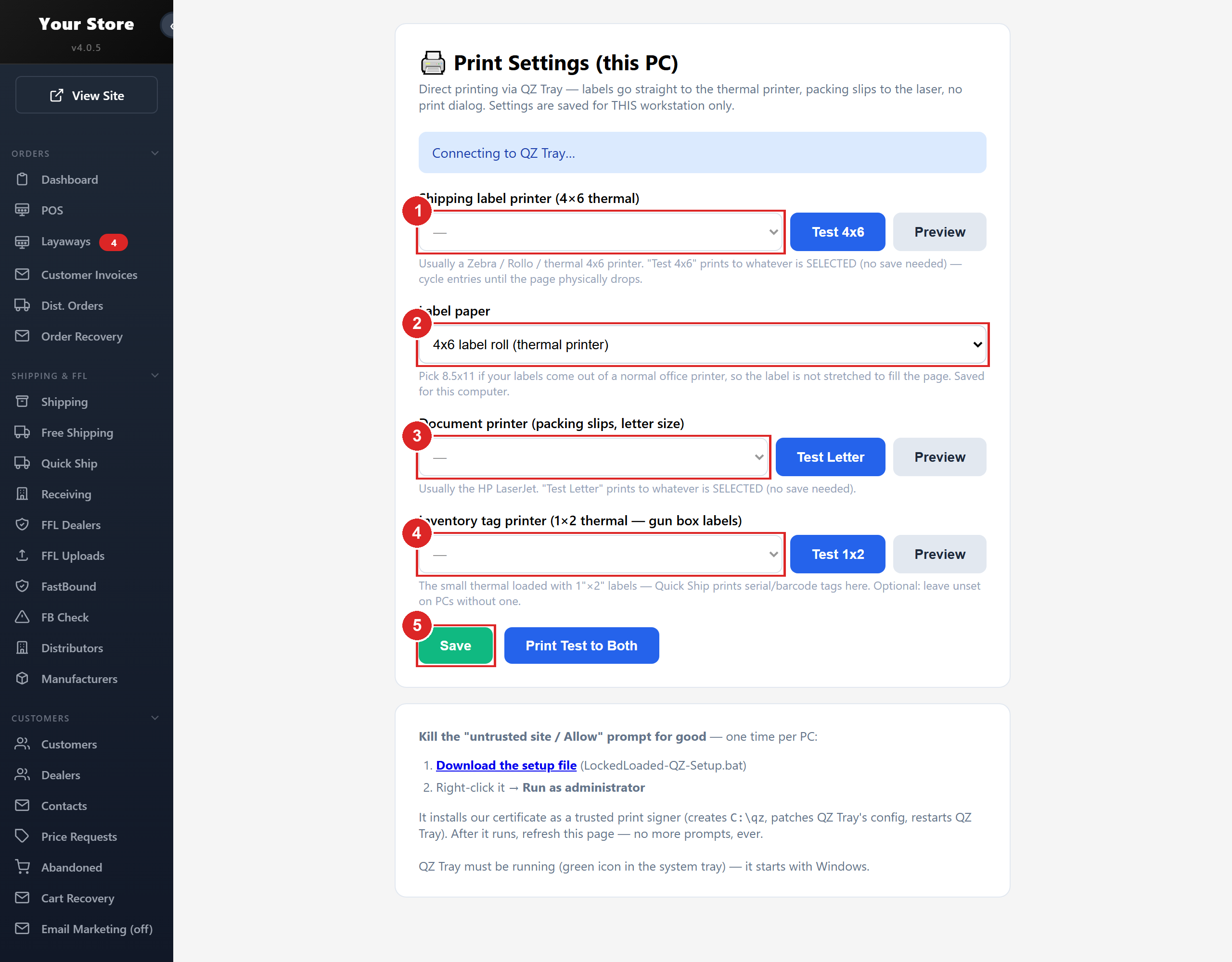
- 1Shipping label printer: the 4x6 thermal that prints shipping labels
- 2Label paper: 4x6 roll, or 8.5x11 sheet when labels come out of an office printer
- 3Document printer: packing slips on letter paper
- 4Inventory tag printer: optional, the small thermal for 1x2 serial tags on gun boxes
- 5Save keeps the choices on this computer only
Shipping labels. Labels are bought through your own accounts. On Settings, Integrations tab, paste your EasyPost production API key under EasyPost (shipping labels). ShipOutdoors (UPS labels for firearms) is a second label account; tick Show ShipOutdoors rates on order pages and its UPS rates join the same list. On the order click Create Label, Get Rates, pick one and Buy Label. With QZ Tray a second button, Buy & Print Both, sends the label to the thermal printer and the packing slip to the laser with no dialogs (Shipping setup: fees, labels and EasyPost).
Tracking. Drop ship tracking is automatic: the platform checks each distributor through the day and the customer gets the email, usually within 30 minutes (Do tracking numbers get added automatically?). For anything else, type the number in Enter tracking # under TRACKING and click Save; tick Hide from customer for a parcel coming to your store (Enter a tracking number by hand).
Return labels. Create Return Label on any order makes a prepaid label from the customer or the FFL dealer back to you or to a distributor, with the RMA # on it (Make a return label). Expedited moves an order to the front of the line, out within 1 to 2 business days once you have payment and FFL; it does not change the carrier (What expedited shipping actually does).
Receiving and Quick Ship. Two more pages do the desk work for stores that keep their book in FastBound; email support@2adata.com and we switch them on. Receiving takes one box at a time: pick who it came from, scan every serial and click Commit Acquisition to FastBound. The box books as one acquisition, every gun goes online, and a 1x2 tag prints per gun. Quick Ship is for a gun a customer is waiting on: scan the UPC, it finds the oldest order waiting on that item, you book the serial, then Continue to Shipping. Buying the label prints the label and slip and writes the FastBound disposition in one pass.
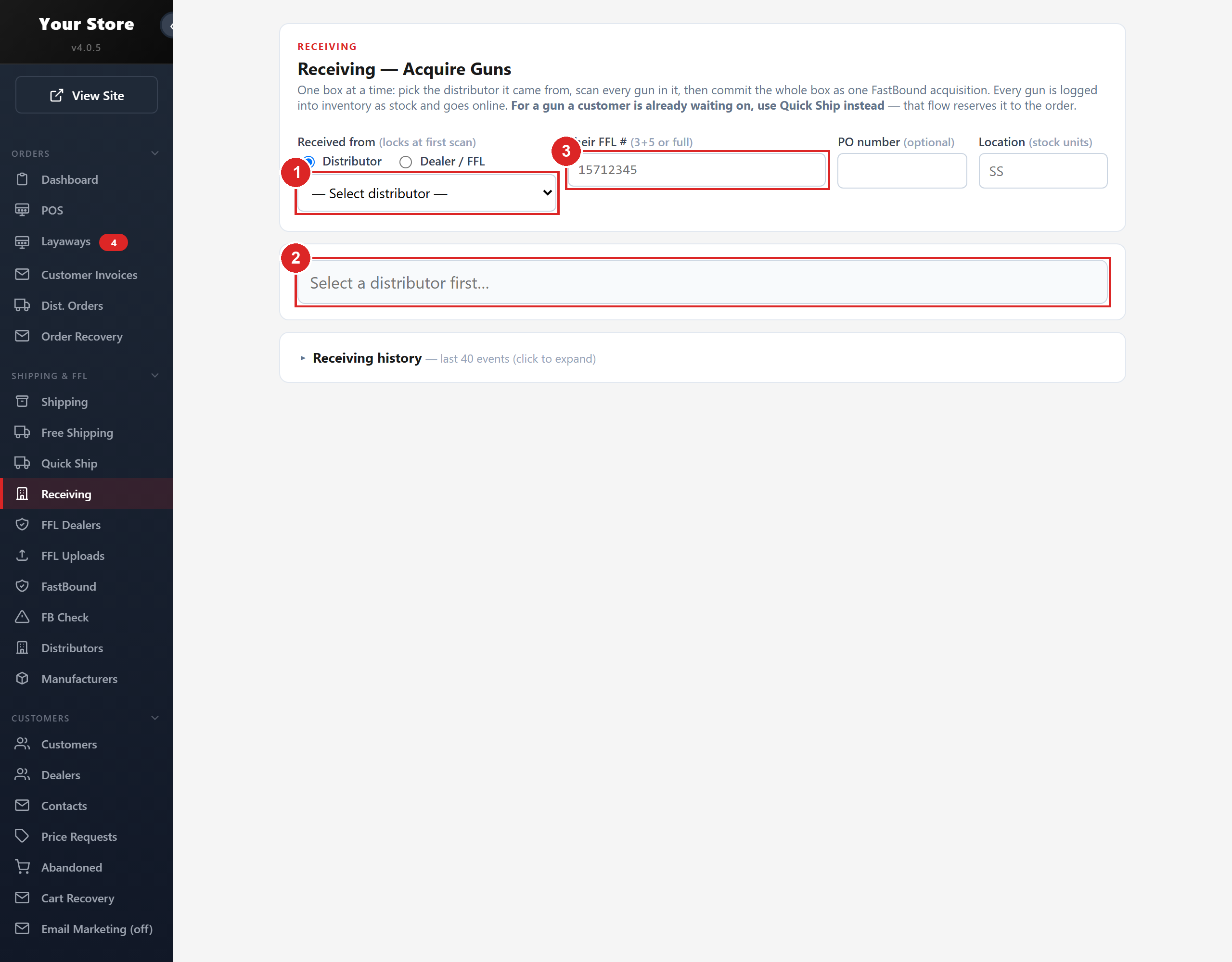
- 1Received from: the distributor or dealer the box came from, locked at the first scan
- 2Scan each gun's UPC, then its serial, one per line
- 3Their FFL #: the sender's license number, saved for the next box from them
Packing slips and invoices
A packing slip goes in the box and tells the receiving dealer what is in it and who to call. An invoice is the customer's copy of the sale.
| Document | Where | What is on it |
|---|---|---|
| Packing Slip (letter) | Order page, Packing Slip | Your logo, the order number with a barcode, Bill To with the customer's name, address, email and phone, SHIP TO FFL DEALER with the dealer's name, FFL number and address, each item with SKU, UPC, quantity, price and serial, a barcode per serial and UPC, totals, and your own FFL license on a firearm order. |
| Invoice (letter) | Order page, Print Invoice | Bill To, Ship To, SKU, serials, totals with any card surcharge. No UPC text, no barcodes, no copy of your FFL. |
| Quick Ship bundle (4x6) | Quick Ship | Three thermal sheets: the label, a compact slip with the customer's name and phone, the dealer's name and each item with UPC and serial, then a full page copy of your FFL license on FFL orders. |
| POS receipt | POS, Print Receipt | The register sale, with FFL TRANSFER REQUIRED when it applies. |
The customer's phone prints under Bill To on purpose, so the dealer receiving a gun knows who to call. The dealer's own phone is not printed (What prints on a packing slip and invoice). Your logo, FFL license image and SOT document are uploaded on Invoice & FFL Settings; that is what prints on slips and goes to distributors on ship to store orders (Your license and SOT on file).
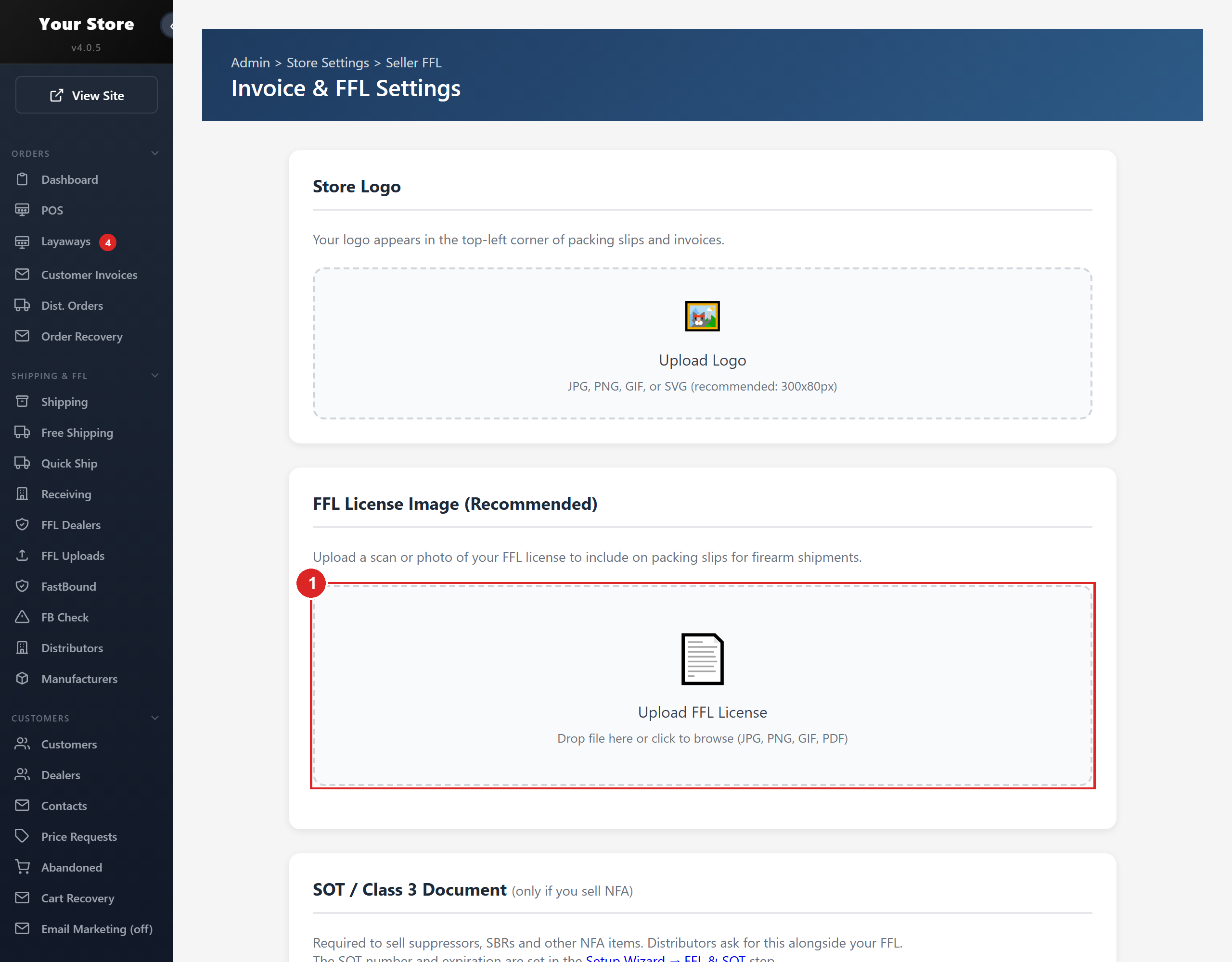
- 1FFL License Image: the copy that prints at the bottom of every firearm packing slip
Customer Invoices invoices a business against their PO; once they approve, Convert to order makes the order. The Returns screen under POS is for register sales (The Returns screen under POS).
The bound book
Trinity does not replace your bound book. Serial numbers on orders are always typed by a person (Firearm orders and the customer FFL).
Connecting FastBound. Open FastBound. Enter your FastBound Account Number and your FastBound API Key from FastBound under Settings, API. Click Save Settings, then Test Connection. Tick the Sync Locations and click Sync Inventory Now: every firearm on hand there is matched to your catalog by UPC and counted as stock.
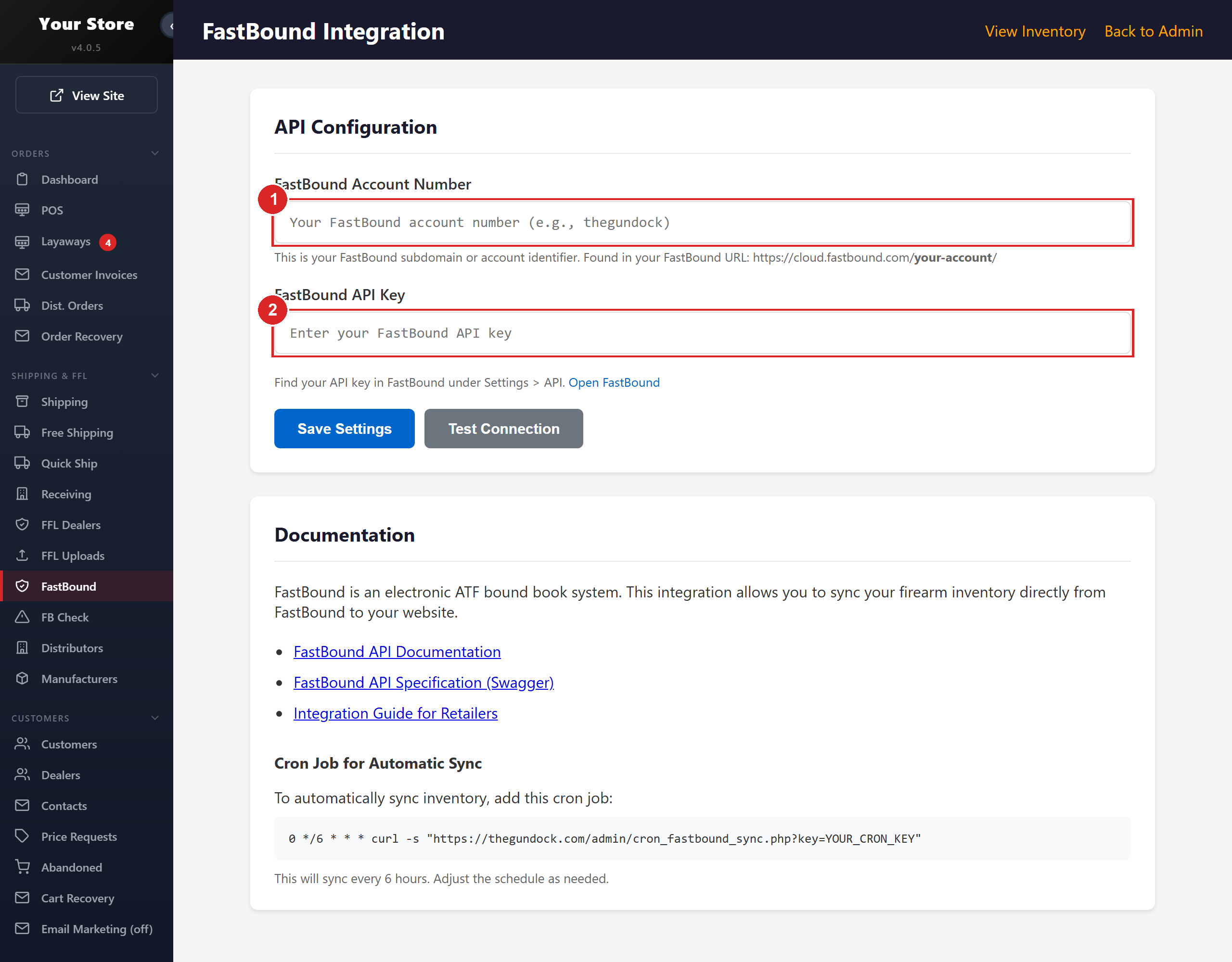
- 1FastBound Account Number: the name in your FastBound URL
- 2FastBound API Key, from FastBound under Settings, API
Acquisitions are written by Receiving and Quick Ship. Dispositions come at label time: on an FFL order the platform offers to create one to the receiving dealer's FFL, with the tracking number, pending for you to commit; Quick Ship does it without asking. If the serial or the dealer's FFL is missing, nothing is written and the shipped order shows Create Disposition Now. FB Check audits the other way: pick a date range, click Run Check, and every shipped FFL order shows whether it was logged out of FastBound.
Book items not matched to a product lists every firearm in your book with no catalog item; until it is linked it cannot be sold (FastBound items not matched to a product).
FFL Dealers is the transfer dealer list: active, preferred, Class III, transfer fee, and the license and SOT documents on file. FFL Uploads holds documents sent by customers and dealers until you Approve or Reject them. You never email FFLs to distributors; the customer's FFL goes out with the drop ship order (Do I need to email FFLs to my distributors?). An NFA order waits in Awaiting Current SOT until the dealer's current SOT arrives, then moves on by itself (What happens when an SOT is uploaded).
Trinity Bound Book, our own record at boundbook.2adata.com, is coming. It is not available to dealers yet.
When an item cannot drop ship
Some brands and distributors will not drop ship. The order still goes through. The platform routes it ship to store, the distributor sends it to you on your dealer account with your own FFL, and you ship it on or hand it over (Drop ship or ship to store). If you would rather never handle ship to store, email us and we set your catalog to count only distributors that drop ship for you.
Brands. On Manufacturers, each brand has Allow dropship from distributors and a list of Blocked Distributors. A brand with drop ship off still sells on your site. On the order the Dropship button is greyed out with the reason, Ship to Store is live, and the automatic picker routes the line ship to store on its own. A distributor you block does not show as a source on the order (How distributor rules decide what you can sell).
Distributors. The platform applies these rules before an order is placed.
| Distributor | Rule |
|---|---|
| Davidson's | Does not drop ship. Every order is ship to store on your account (Which distributor account an order is billed to). |
| Gunarama | Ship to store only. |
| Chattanooga | A line under $50 ships to store (their $7.50 minimum order fee); hazmat and NFA items are never drop shipped. An item they mark ship to store only is refused with error 60203; send it again with Ship to Store (Chattanooga will not drop ship an item (error 60203)). |
| Camfour | Will not drop ship to Alaska or Hawaii. |
| RSR | Keeps a Blocked from Dropship list for your account; those items ship to store. A firearm going to a dealer not on RSR's list may come to your store instead (An RSR firearm order is coming to your store instead of the FFL dealer). |
| Lipsey's | Drop ship and ship to store are two logins. Enter both (Lipsey's ship to store login). |
| Any | A PO Box address ships to store (distributors ship UPS and FedEx; you can ship USPS). eBay orders ship from your store. |
What to expect. The order moves to Distributor (Ship to Store). The tracking is the box coming to you and is never sent to the customer (Why did my customer not get tracking for a ship to store order?); set Customer STS Notice so they know it is in hand. When it arrives, receive it, log a firearm in your book, and ship it on with Quick Ship, or set Ready for Pickup. What it costs you is the handling and the outbound label. On our own store, 129 of 135 Chattanooga orders under $50 went ship to store and the outbound labels averaged $6.61, against Chattanooga's $7.50 fee.
What the store emails your customer, and when
The status you set is the message the customer gets. Most statuses send a fixed email when saved; some send nothing. A wrong status sends a wrong email, and a late one sends nothing. See What each order status means.
| When | The customer gets | Why it matters |
|---|---|---|
| An order is placed (online, phone order, pay in person, GunBroker) | An order confirmation with the items, the total and, for a firearm, the FFL instructions. | Automatic. |
In Processing or Shipped - 3-5 Days | "Your Order is Processing": tracking promised within 24 to 48 hours. | Set it only when that is true. Automatic ordering sends it too. |
| Distributor (Ship to Store) | One "Status Update" a day later: in processing, ships soon. | Once per order. |
| Awaiting FFL or Awaiting Current SOT | A request for the dealer's license (SOT too for NFA). Their dealer gets it too if their email is on file. | Automatic ordering sends it too, once a day at most. |
| Link FFL Dealer or Upload FFL | "FFL Received": the dealer's name, order processing. | Once per order. |
| Physical Address Needed | A request to reply with a street address; no PO Boxes. | The order waits on the reply. |
| Awaiting CA Waiver, Awaiting CO Waiver | The state form as a PDF: reply with it signed plus a photo of their state ID. | The order waits on the reply. |
| Awaiting Hazmat Approval | The hazmat fee: reply Approved or Cancel. | You act on the reply by hand. |
| Pending Verification (Fraud Check) | A link to upload a photo ID and a selfie, good 7 days. | Send Verification Email resends it. |
| Customer STS Notice | Their order is being brought into your store; no need to call. | What the Customer STS Notice status sends |
| Ready for Pickup | At the store: address, hours, what to bring, balance due. | What Ready for Pickup sends |
| Tracking lands on a shipment (distributor, label, or by hand) | "Your Order Has Shipped", with a tracking link. | Shipped alone sends nothing. The leg to your store never goes out. Enter a tracking number by hand |
| Cancelled (Out of Stock) | Order cancelled, full refund in 3 to 5 business days. | It moves no money: run Process Refund too, or the email lies. |
| Process Refund, Rebill Customer, Record Payment | A receipt for the refund, charge or payment. | Automatic. Record Payment only while Send confirmation email is ticked. Refund an order (website and GunBroker orders) |
| Email for price | Your real price with a code, good 7 days, and a reminder before it expires. | On by default. Offers send no email. Email for price and MAP |
| A cart left after typing an email | A reminder with a cart link, hours later and again two days later. | Off until turned on under Cart Recovery. |
| About 10 days after shipping, once tracking shows delivered | "How Was Your Purchase?" asking for a review. | Off until turned on under Settings, Review Requests. Review request emails |
| A layaway | Started, each payment, reminders before and after the due date, paid in full, cancelled. | On by default. Layaway Settings. Manage layaways: payments, reminders, past due, refunds |
Two more go out on their own with no switch in the admin: a help email about 45 minutes after a card is declined twice, and a lower requote when a quoted price expires without a purchase.
These send nothing; email the customer yourself:
- Pending, Local Pickup, New GunBroker Order
- Shipped,
Shipped - 24-48 Hours, Partially Shipped: the tracking email is the shipping notice - Cancelled, Refunded, Pending Cancellation, Payment Declined (Credova declines email on their own)
- Do Not Ship Hold, Awaiting Return, Backordered, Out of Stock (Alerts)
- Needs Human Review emails you, not the customer
To check a send, read the order's Order History. Every order email writes a line there as it goes; the status banner does not. No line, or a FAILED line, means nothing went: send it by hand. See How do I know my emails are actually going out?.
Also in your admin
Trinity also has layaway, pay in person at pickup, gift cards, Credova financing, promo codes and your own shelf stock beside the feeds. Each is a switch in your admin. See Set up layaway, Gift cards and Add your own local inventory.