
Getting Started with Trinity · Chapter 13 of 15
Fraud: with NoFraud and without it
Fraud on a firearms store is not about guns. A firearm goes to an FFL who checks the buyer's identity, so stolen cards almost never buy guns. They buy optics. Leupold, Trijicon, Holosun, thermal and night vision, $400 to $2,000 an order, shipped to a house. We have seen the pattern on our own store: a run of orders in two weeks from brand new GunBroker accounts with stolen cards, all for premium optics, and a website order for a high end watch that shipped and charged back.
What the platform does on every store
- Address and security code checks on every card, with the result on the order page.
- A pause after repeated declines from the same shopper, which stops card testing.
- Hidden trap fields on the account, dealer application and contact forms that only robots fill in.
- GunBroker buyer gates, where automatic ordering is switched on: an order from a brand new or zero feedback account buying $200 or more of optics, lights, thermal or night vision is never ordered automatically, even if a screening service passed it. It waits for a person.
- Holds. A held order does not ship until you decide on the order page. On a store connected to NoFraud with an API key, an order NoFraud held for review goes back to pending on its own when NoFraud approves it. A hold you set yourself stays until you release it. A card payment your card processor holds for review also creates the order on hold, with Approve payment and Decline payment on the order page; see Approve or decline a card payment held for review.
- Fail closed. If a screening service is turned on and does not answer, the order is held and marked ERROR, not shipped.
If you use NoFraud
NoFraud screens website card orders in real time and either passes them, flags them for review or fails them. It never screens an order with a firearm or any other item that ships to an FFL dealer, a customer who already has a paid order more than 90 days old and no chargeback or fraud mark on record, pay in person, an order paid in full by gift card, Credova financing, or a card payment your card processor held for review. It never screens a phone order keyed in the admin or a sale at the register. On GunBroker, a store connected with an API key screens only orders without a firearm from buyers with fewer than ten feedbacks. A pass comes with a chargeback guarantee under NoFraud's terms. On our own store it screens website orders without a firearm and GunBroker orders from new buyers; in 90 days it flagged 10 orders and we cancelled 5 for fraud. It costs a fee per screened order; get current pricing from NoFraud. A few dealers run it on their own NoFraud accounts; most do not yet.
NoFraud is now owned by Wyllo, and its portal is still portal.nofraud.com. To turn it on, sign up with NoFraud. If they give you an API key, open NoFraud in your admin (left menu, under Tools), paste the key into API Key, switch screening on, and click Save Settings. The page then reads Screening Active. If they give you Direct API credentials instead (an integration ID and a client secret), there is no box for them in your admin: email us and say so, without sending the secret itself, and we connect your store for you.
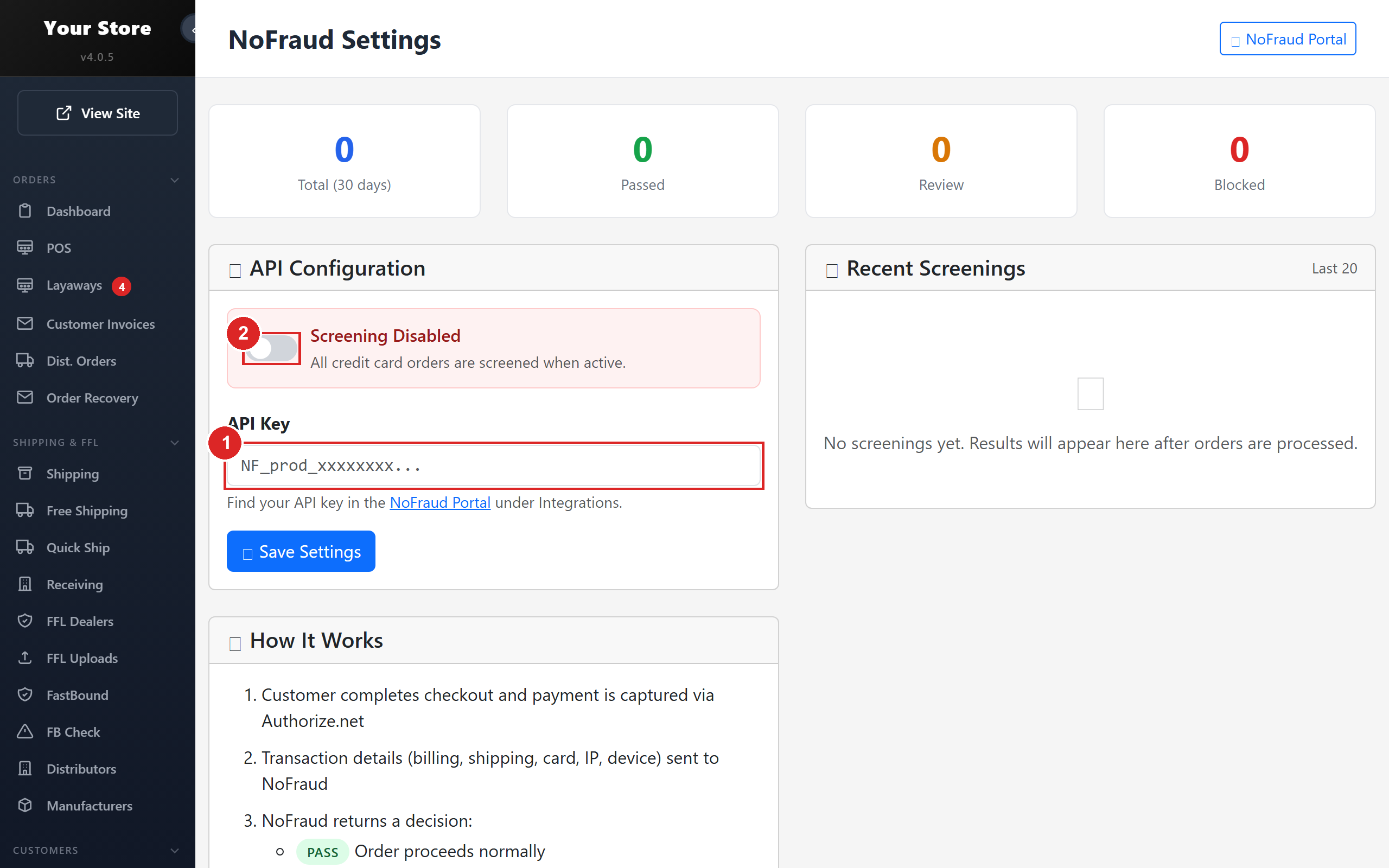
- 1Your NoFraud API key
- 2Turn screening on, then click Save Settings
A fail at checkout voids the charge and no order is created; you get an email. A review or an error puts the order on Do Not Ship Hold. On a store connected with an API key, the store asks NoFraud again every 15 minutes and releases a review hold when NoFraud approves the order. If an order is still on hold, look it up in the NoFraud portal and release it yourself once NoFraud has approved it. What each result on the order means, and what to do: Orders held for fraud review: the Do Not Ship HOLD status.
If you do not
Then you are the screen. The checks above still run, and on Authorize.Net a payment its fraud filter holds still comes to you to approve or decline. Review the rest yourself before shipping, with these as the signals that matter:
- The street address did not verify (the card's bank says the address does not match).
- Billing and shipping names differ, or the name does not match the email.
- Optics, lights or thermal over $200, shipped to a residence, from a customer with no order history.
- A GunBroker account younger than 30 days or with fewer than ten feedbacks on a high value accessory.
- Rush requests, odd hours, a free email address on a new account.
When in doubt, call the customer at the billing phone number. A real customer answers. A thief does not. And if you are wrong, you lose a sale; if you ship, you lose the item, the shipping and whatever chargeback fee your merchant account charges, and your processor starts to watch you.